 today deals
 special offer

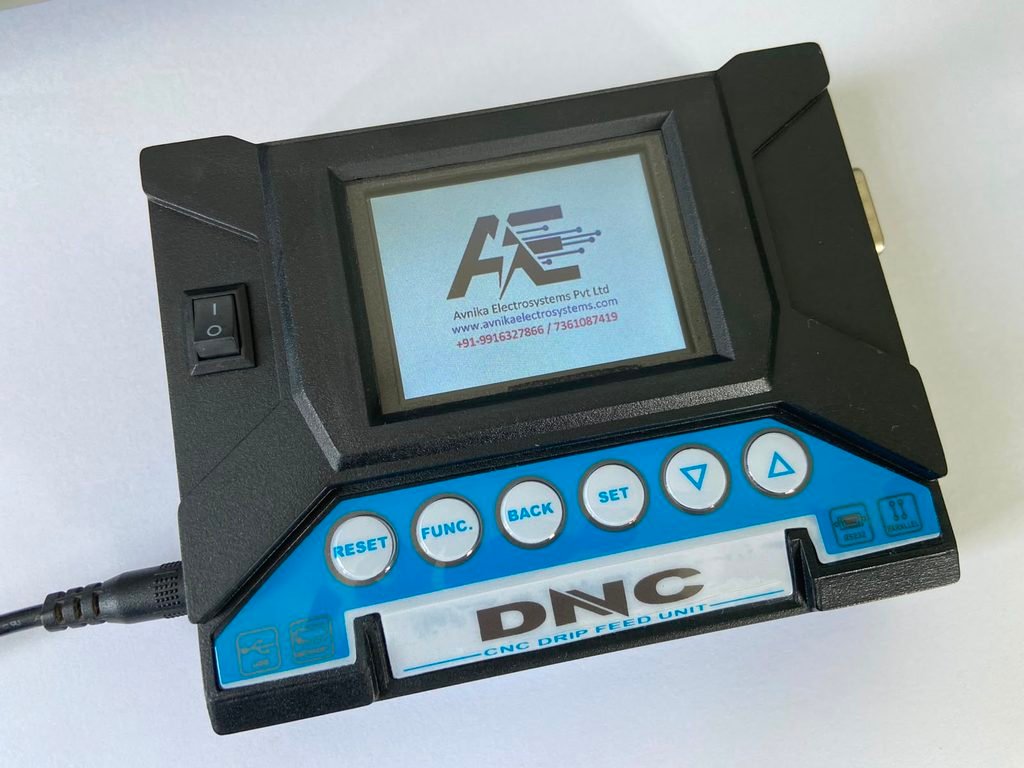
New DNC Device for your CNC
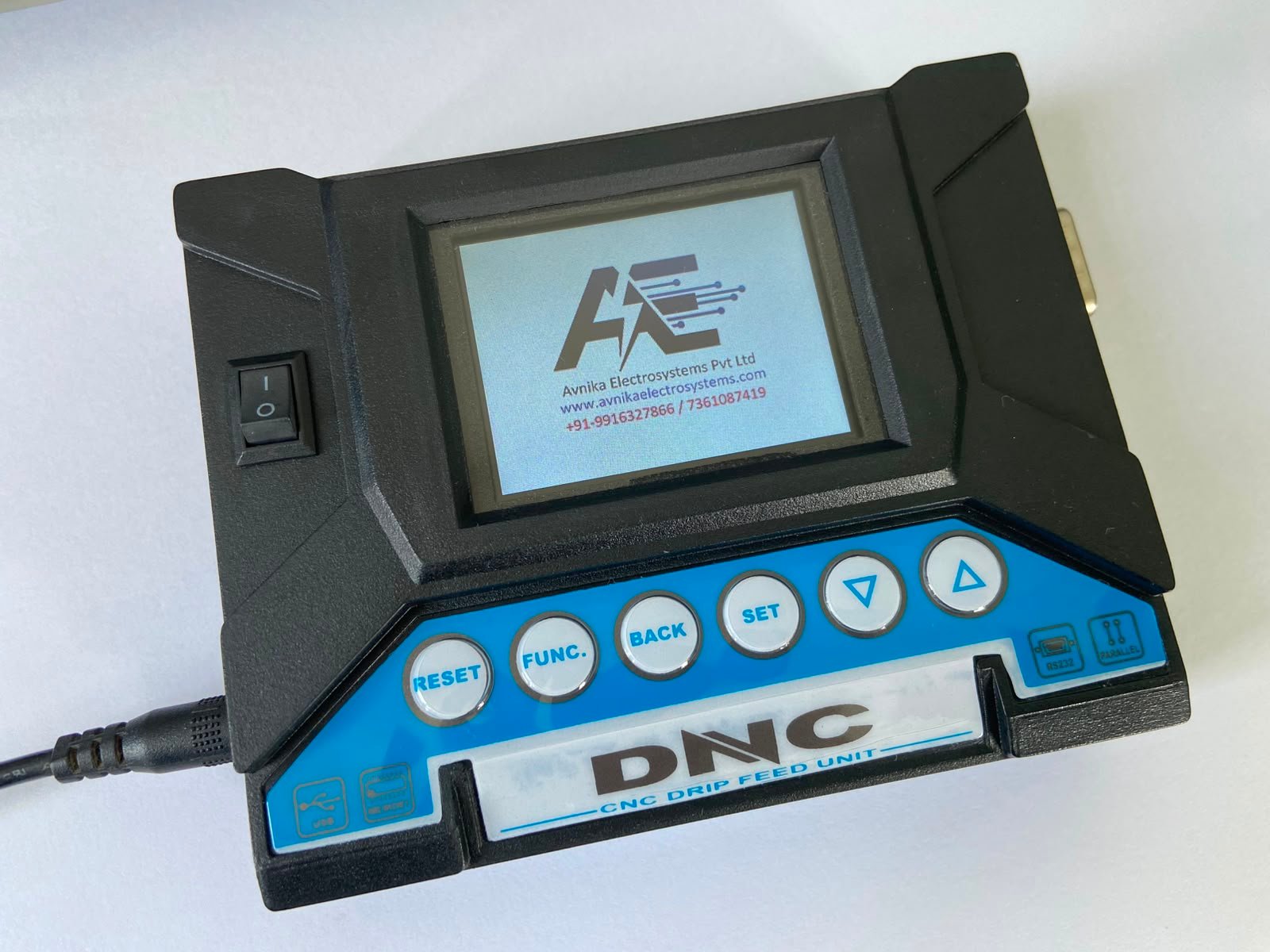
DNC Titan Series




Yes. For dnc-device.com, I would make the homepage a detailed, product-focused page that reads naturally for a CNC operator or manufacturing engineer, while also giving Google enough topical depth around DNC devices, CNC program transfer, USB DNC, RS232 DNC, CNC/VMC machines, and controller compatibility.
Below is ready-to-copy homepage content. You can paste the sections directly into WordPress and then add your product images/buttons where indicated.
Reliable CNC Program Transfer with USB and RS232 DNC Solutions
Transfer CNC programs between your computer, USB storage device, and CNC machine with a practical DNC solution designed for modern and legacy CNC controllers.
Whether you operate a CNC machining center, VMC, CNC lathe, or older machine with an RS232 communication port, a suitable DNC device can make CNC program transfer easier, faster, and more convenient.
[Explore DNC Devices] [Check Compatibility]
Managing CNC programs can be challenging when a machine has limited internal memory, an older controller, or only an RS232 serial communication port.
A DNC device provides a convenient connection between an external computer or storage device and the CNC controller. Instead of manually entering long G-code programs into the machine, operators can transfer programs electronically.
This makes DNC communication particularly useful in machine shops where CNC programs are regularly created, edited, transferred, backed up, and reused.
Our DNC solutions are designed for practical CNC applications, including CNC machining centers, VMC machines, CNC lathes, turning centers, and other compatible machine tools.
A DNC device is a hardware solution used to transfer CNC programs between an external source and a CNC machine controller.
DNC stands for Direct Numerical Control. In a typical application, the DNC device acts as a communication bridge between the CNC controller and a computer, USB storage device, or other compatible data source.
A basic CNC program transfer process looks like this:
Computer / USB Storage → DNC Device → CNC Controller
Programs can also be transferred in the opposite direction:
CNC Controller → DNC Device → Computer / Storage
This allows CNC operators to send programs to the machine and, where supported, retrieve programs from the CNC controller for backup or further editing.
DNC solutions are especially useful for machines that have limited memory or older controllers that do not provide modern USB connectivity.
Many CNC machines, particularly older and legacy machines, were designed before USB storage and modern network connectivity became common on the shop floor.
These machines may use:
Entering a long CNC program manually can take considerable time and can introduce typing errors.
A DNC device provides a more convenient method of transferring the program electronically.
For example, an operator can prepare a CNC program on a computer, save it to the appropriate storage device, and transfer it to the CNC controller instead of entering every line manually.
For manufacturing companies operating older but productive CNC machines, a DNC solution can therefore provide a practical way to improve program management without replacing the entire CNC controller.
The basic operation of a DNC device is simple.
The CNC program is created or edited using CAM software, CNC programming software, or a text editor.
The program normally contains the G-code and other machine instructions required for the machining operation.
The program is saved on a computer or compatible USB storage device, depending on the type of DNC system being used.
The DNC device is connected to the CNC machine using the appropriate communication interface and cable.
For many legacy CNC machines, this may be an RS232 serial connection.
The operator selects the required CNC program from the available files.
The DNC device sends the program to the CNC controller.
Depending on the application and DNC system, the program may be transferred to the controller memory or streamed to the CNC machine during machining.
The CNC operator checks the program, offsets, tooling, workholding, and other machine conditions according to the normal machine operating procedure.
Once the program has been verified and the machine is ready, machining can begin.
A USB DNC device provides a convenient way to transfer CNC programs using USB storage.
USB connectivity is familiar to most operators and can be easier to manage than older computer systems that require a dedicated serial port.
USB DNC solutions can be particularly useful when a CNC machine has an older controller but the operator wants a more convenient method of handling CNC programs.
Depending on the product and CNC controller, a USB DNC solution can help with:
Before selecting a USB DNC device, it is important to confirm the CNC controller model and communication interface.
[View USB DNC Devices]
RS232 remains widely used for CNC program transfer on older CNC machines and controllers.
An RS232 DNC device provides a communication link between an external system and the CNC controller.
A typical setup may look like:
Computer → RS232 Cable → DNC Interface → CNC Controller
The exact connection depends on the CNC controller and machine configuration.
For reliable communication, several parameters may need to be configured correctly, including:
The physical cable and pin configuration are also important. Two CNC machines may use the same controller manufacturer but have different communication connections depending on the machine builder and controller configuration.
DNC devices can be useful across different types of machine tools where CNC program transfer is required.
Transfer machining programs to CNC machining centers and manage programs externally when the controller’s internal memory is limited.
Use DNC communication to transfer G-code programs to compatible Vertical Machining Centers.
Transfer turning programs between an external computer or storage device and compatible CNC lathe controllers.
DNC communication can help manage programs used for production turning applications.
A DNC solution can provide a practical communication method for older CNC machines that do not have modern USB or Ethernet connectivity.
DNC compatibility depends on more than the CNC controller brand.
The controller model, communication port, connector, cable configuration, communication parameters, and machine-builder configuration can all affect compatibility.
DNC solutions may be used with compatible CNC controllers from manufacturers such as:
However, compatibility should always be confirmed based on the actual CNC controller model and machine communication setup.
If you are unsure which DNC device is suitable for your machine, provide the controller model and communication details before purchasing.
One of the main applications of a DNC device is CNC program transfer.
Instead of manually typing a complete program into the CNC controller, the operator can transfer the program electronically.
This can be particularly useful for large programs containing hundreds or thousands of lines of G-code.
A DNC system may be used for:
Transfer CNC programs from a computer to the CNC controller.
Transfer programs from USB storage to a compatible CNC machine.
Retrieve CNC programs from the controller and save them externally for backup or editing, where supported.
Use an external source to provide CNC program data when the machine controller has limited internal memory.
Electronic program transfer can be much more convenient than manually entering a long CNC program.
Transferring a program electronically can reduce the need for manual typing of G-code.
External program transfer can be useful when the CNC controller has limited internal memory.
Programs can be transferred from the CNC machine to an external system where supported, helping operators maintain backup copies.
DNC solutions can help connect older CNC machines that still use serial communication.
USB DNC devices can provide a familiar method of handling CNC program files.
A properly configured DNC solution can simplify the movement of CNC programs between programming systems and machines.
DNC devices are commonly used in manufacturing and engineering environments where CNC programs need to be transferred between external systems and machine controllers.
Typical applications include:
Replacing an entire CNC controller simply because the machine does not have USB or modern network connectivity may not always be practical.
Many older CNC machines continue to provide accurate and productive machining when properly maintained.
A DNC device can provide an external communication solution for compatible machines that still depend on traditional serial communication.
This makes DNC technology particularly useful for workshops that have a combination of newer CNC machines and older machines.
Instead of changing the complete machine control system, a suitable DNC solution can provide a practical method for transferring CNC programs.
| Manual Program Entry | DNC Program Transfer |
|---|---|
| Program entered manually | Program transferred electronically |
| Time-consuming for long programs | More convenient for large programs |
| Higher possibility of typing mistakes | Reduces manual typing |
| Difficult to manage large programs | External program management is possible |
| Limited by operator input | Program can be prepared externally |
| Manual backup process | Easier external backup where supported |
A DNC device does not replace the CNC controller. Instead, it provides a communication method between the controller and an external program source.
Not every DNC device will work with every CNC machine.
Before selecting a DNC device, check the following information:
For example:
Fanuc, Siemens, Mitsubishi, Haas, Okuma, Fagor, etc.
The exact controller model is important because communication options can differ between controller generations.
Check whether the machine uses:
The physical connector and pin configuration should match the CNC machine and DNC device.
Check the CNC communication settings, including baud rate, parity, data bits, stop bits, and flow control.
The machine builder may have configured the CNC communication interface differently from a standard controller setup.
If the machine already has an RS232 cable, providing a photograph or details of the cable can help identify the required connection.
Choosing a DNC device becomes much easier when the CNC controller information is available.
If you are unsure which DNC solution you need, send us:
CNC Controller Manufacturer:
Fanuc / Siemens / Mitsubishi / Haas / Other
Controller Model:
For example, Fanuc 0i, 16i, 18i, 21i, etc.
Machine Type:
VMC / CNC Lathe / Machining Center / Turning Center
Machine Make & Model:
Your machine manufacturer and model
Communication Port:
RS232 / USB / Ethernet / Other
Existing Cable:
Photo or details, if available
With these details, the appropriate DNC solution and communication setup can be identified more accurately.
[Check DNC Compatibility]
We provide DNC solutions for different CNC program transfer requirements.
USB-based solutions for convenient CNC program transfer.
[View USB DNC Products]
Solutions for CNC machines using RS232 serial communication.
[View RS232 DNC Products]
Compatible communication cables for connecting DNC systems with CNC controllers.
[View DNC Cables]
Additional accessories required for specific CNC communication setups.
[View DNC Accessories]
A DNC device should not make CNC programming more complicated.
The goal is simple: make it easier to move CNC programs between your programming system and machine.
Whether you are operating a modern workshop with multiple CNC machines or maintaining an older VMC with an RS232 controller, the right DNC solution can simplify your program transfer process.
Our focus is on practical CNC communication solutions that are easy to understand, configure, and use.
A DNC device is used to transfer CNC programs between an external computer or storage system and a CNC machine controller. It is commonly used with CNC machines that have RS232 or other compatible communication interfaces.
DNC generally refers to Direct Numerical Control. In CNC applications, DNC systems are used to transfer or manage CNC program data between an external system and one or more CNC machines.
A USB DNC device allows CNC programs to be transferred using USB storage or USB connectivity, depending on the specific product. It is commonly used as a convenient alternative to older computer-based serial communication methods.
A compatible DNC device can be used with many Fanuc CNC controllers. However, compatibility depends on the exact Fanuc controller model, communication interface, cable configuration, and communication settings.
Yes. RS232 is one of the common communication interfaces used for CNC program transfer, particularly on older CNC controllers.
Yes, with a compatible USB DNC solution and CNC controller configuration. The exact process depends on the DNC device and CNC controller.
DNC systems can be useful for large CNC programs, particularly when the machine controller has limited internal memory. Some DNC systems can stream program data to the CNC controller rather than requiring the complete program to be stored internally.
No. DNC compatibility depends on the CNC controller, communication interface, machine configuration, and DNC device. The controller model should be checked before purchasing.
The most useful information includes the CNC controller manufacturer, controller model, machine model, communication interface, connector type, existing communication cable, and CNC communication settings.
No. CNC stands for Computer Numerical Control and refers to the machine control system. DNC is generally used for communication and management of CNC program data between an external system and CNC machines.
Yes. DNC devices can be used with compatible VMC machines for transferring CNC programs between an external system and the VMC controller.
Whether you need a USB DNC device, RS232 DNC solution, CNC communication cable, or another CNC program transfer solution, selecting the correct device starts with understanding your machine controller.
Send us your CNC controller model, machine model, and communication interface and we can help you identify a suitable DNC solution.
[Request a Quote]
[Check Compatibility]
Avnika Electrosystems Pvt. Ltd.
Bengaluru, Karnataka, India
Phone: +91 99163 27866
Email: info@avnikaelectrosystems.com
[Get a Quote] [Check Compatibility]